


Key Takeaways
- Wrong keyword rankings occur when Google sends traffic that doesn’t match your page’s goal, leading to high bounce rates and zero conversions despite decent traffic numbers
- Main causes include mixed on-page signals, keyword overload, weak content focus, title-content mismatches, thin content, misleading anchor text, and keyword cannibalization across multiple pages
- Use Google Search Console’s “Search results” report filtered by page URL to see every query triggering your content, along with clicks, impressions, and average position data
- Compare your keyword profile against top-ranking competitors using tools like Ahrefs or SEMrush to identify intent mismatches and structural differences in content approach
- Not all unexpected rankings need fixing – keep rankings that drive conversions, strong engagement, easy top positions, topical expansion opportunities, or beat weak competition
- Fix wrong rankings by aligning title tags, H1s, meta descriptions, and body content around one primary keyword while reducing overemphasis on competing secondary terms
- Monitor engagement metrics like average engagement time and bounce rate in Google Analytics to distinguish truly wrong keywords from unexpected opportunities worth preserving and expanding
You just checked your rankings and – SURPRISE – your blog post on email marketing strategies is sitting at #2, but not for the keyword you wanted. Instead, it’s showing up for “how to write a newsletter subject line.” And the real target, “email automation best practices”? Buried on page four, zero clicks, totally ignored.
Honestly, this is one of the most annoying parts of SEO: ranking for the wrong keywords. You put together a deep-dive guide for marketers ready to automate, but Google’s sending you people who just want quick tips about subject lines. They land on your page, realize it’s not what they need, and leave almost immediately.
But here’s the thing – it’s fixable. Seriously, you’re not alone – plenty of people run into the same mess. Every day, tons of websites watch the wrong keywords grab the top spots while the important terms get left behind.
In this guide, I’ll show you why Google gets confused about your content, how you can figure out what’s going wrong, and, most importantly, how to win back those rankings for keywords that actually move the needle for your business.
What “Ranking for the Wrong Keywords” Really Means
Wrong keyword rankings happen when Google sends you traffic that doesn’t match your page’s goal. Think of it like a pizza shop getting customers who want burgers – sure, people walk in, but nobody’s buying because you’re not selling what they need.
Wrong Audience
Your page attracts people who will never buy from you. A business selling premium graphic design software ranks for “free logo makers” and gets thousands of visitors looking for zero-cost tools. They click, realize it’s paid, and leave immediately. This is a common situation where traffic increases but conversions stay flat.
Wrong Intent
Searchers want tutorials, but you’re showing comparisons. Your detailed product comparison guide ranks for “how to use Photoshop” queries. Visitors expect step-by-step instructions with screenshots. Instead, they find pricing tables and feature lists comparing different software options.
Wrong Stage
Beginners find your advanced content, experts miss it entirely. Your technical troubleshooting article ranks for “what is SEO” instead of “fix crawl errors.” New learners see confusing terms like canonical tags and schema markup. Meanwhile, experienced marketers who actually need that information never discover your page.
Wrong Topic
Google thinks your page is about something completely different. Your content marketing strategy article ranks for “Hootsuite alternatives” because you mentioned scheduling tools once. That single paragraph now defines your entire page in Google’s eyes, sending social media tool shoppers your way.
Why Your Page Ranks for the Wrong Keywords and How to Fix It
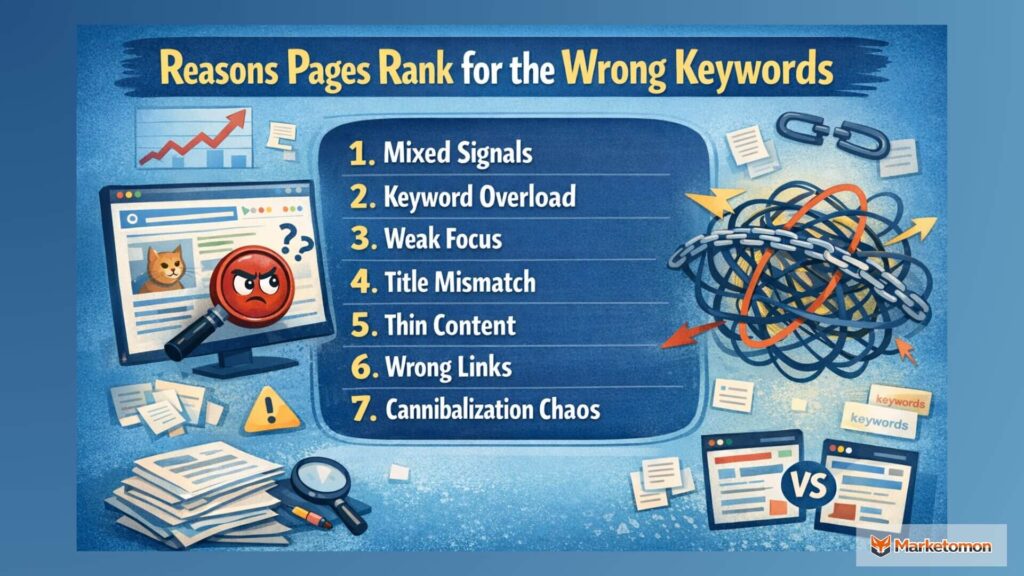
Understanding why Google picked the wrong keywords helps you fix the problem faster. Most ranking issues come from a handful of common mistakes that are easy to spot once you know what to look for. Research from Exploding Topics shows that 52.65% of Google searches are informational, increasing the chances of intent mismatch between what users want and what pages are optimized for.
Mixed Signals
Your page tells Google conflicting stories about its main topic.
- What happens: The title says “Best Email Marketing Software” but your H1 reads “How to Build an Email List” and your first paragraph discusses newsletter design. Google sees three different topics competing for attention.
- Why it’s wrong: The algorithm picks whichever theme appears strongest based on word count, placement, and emphasis. Often, this isn’t your intended target keyword.
- The result: Your meta description mentions automation, while internal links use anchor text about templates. These contradictory signals confuse Google, making it rank you for whatever seems most dominant.
- Quick fix: Align every element – URL, title, headings, and content – around one clear primary topic. Secondary topics can exist, but shouldn’t overshadow your main keyword.
Keyword Overload
You accidentally repeated supporting keywords more than your main target.
- What happens: While writing about “project management tips,” you naturally mentioned “collaboration tools” throughout because it felt relevant. You weren’t counting, just writing conversationally.
- The numbers: Google finds 47 mentions of “collaboration tools” versus 23 mentions of “project management.” The algorithm interprets collaboration as your primary focus.
- Why it happens: Supporting examples and related concepts pile up quickly when you’re trying to be thorough and helpful to readers.
- The result: You rank for collaboration tools instead of project management, attracting the wrong audience entirely.
- Quick fix: Use a keyword density checker before publishing to ensure your primary keyword appears more frequently than secondary ones.
Weak Focus
Your content tries to cover too many topics on one page.
- What happens: You write “The Complete Guide to Digital Marketing” covering SEO, social media, email, content, and paid ads equally. Each section gets 300 words.
- Google’s confusion: The algorithm can’t determine which topic matters most since you gave them equal weight and depth.
- The result: You rank for random subtopics like “Instagram story dimensions” instead of “digital marketing guide” because that specific section had more concrete details.
- Why breadth backfires: Broad coverage sounds comprehensive but creates topical confusion. Google prefers depth on one subject over surface-level coverage of many. Clear focus usually breaks when the underlying marketing strategy is not defined upfront.
- Quick fix: Create separate dedicated pages for each major topic and link them together as a content cluster.
Title Mismatch
Your headline promises one thing, but the content delivers another.
- What happens: Your title reads “Instagram Marketing Strategy 2026” but 70% of your content actually explains general social media basics that apply to any platform.
- The disconnect: Google reads your entire page, not just the title. Search Engine Journal reports that Google rewrites more than 61% of title tags in search results, often when page content does not fully support the headline’s promise. When content doesn’t match the headline promise, the algorithm trusts the body text more.
- The result: You rank for “social media marketing basics” instead of Instagram-specific terms because that’s what you actually wrote about.
- User impact: Visitors searching for Instagram strategies feel misled when they find generic advice, causing high bounce rates that further hurt rankings.
- Quick fix: Rewrite either your title to match existing content or expand your content to fulfill the title’s promise.
Thin Content
Your page lacks enough depth on your target topic.
- What happens: You write 400 words about “advanced SEO techniques” but only scratch the surface with basic definitions and brief mentions.
- Competition comparison: Top-ranking pages for that keyword have 2,500+ words with detailed examples, case studies, and step-by-step instructions. Backlinko’s content analysis shows that long-form pages consistently outperform short content for competitive keywords, especially when depth and structure are strong.
- Google’s decision: Your page can’t compete for competitive terms, so the algorithm ranks you for easier, less valuable keywords like “what is SEO” instead.
- The depth gap: Without substantial coverage, Google assumes your page better answers simpler questions that require less detail.
- Quick fix: Expand content with specific examples, data, actionable steps, and comprehensive coverage that matches or exceeds competitor depth.
Wrong Links
Internal and external links point to your page using misleading anchor text.
- What happens: You wrote about “content marketing ROI” but five internal links from other pages use anchor text like “blogging tips” or “how to write articles.”
- Google’s interpretation: Anchor text tells Google what a page is about. When multiple links use different anchor text, those phrases become ranking signals.
- The result: You rank for “blogging tips” because that’s how your own website keeps describing the page, even though the content focuses on ROI measurement.
- External links: If other sites link to you using off-topic anchor text, that reinforces the wrong keyword associations.
- Quick fix: Audit all internal links pointing to your page and update anchor text to match your target keyword naturally.
Cannibalization Chaos
You have got a bunch of pages fighting over the same keywords.
- What happens: You have three articles about email marketing: “Email Marketing Guide,” “Email Campaign Tips,” and “Email Newsletter Best Practices.” All target similar keywords.
- Google’s confusion: The algorithm can’t decide which page should rank for “email marketing tips” since all three seem relevant.
- The wrong winner: Google picks your oldest or most-linked page, which might be your weakest content, while your best article gets ignored.
- Split authority: Instead of one strong page, you have three weak ones splitting ranking power and backlinks between them.
- Quick fix: Consolidate similar pages into one comprehensive resource or clearly differentiate each page’s specific focus and target keywords.
Related Read: How to Find Your Website’s Cannibalized Keywords Without Paid Tools
How to Diagnose Which Keywords You’re Actually Ranking For
Before fixing your rankings, you need to know exactly which keywords are causing problems. This detective work takes about 30 minutes and reveals precisely where Google thinks your content belongs.
Search Console
- Step 1: Open your site’s performance data
- Go to search.google.com/search-console and sign in.
- At the top of the screen, use the property selector to choose the correct website. This ensures you are viewing data for the right domain.
- Step 2: Lock the view to a single page
- In the left sidebar, click Search results.
- Near the top of the report, click the Pages tab.
- Scroll or search to find the exact page URL, then click it.
- The report is now filtered to that one page only.
- Step 3: See which keywords bring traffic
- Click back to the Queries tab.
- You now see every search term that triggered this page, along with clicks, impressions, average position, and click-through rate for each keyword.
Manual Checks
- Step 1: Remove personalization from results
- Open a new incognito or private browser window.
- Type your target keyword into Google and scroll slowly through the first three result pages. This shows how your page appears to neutral searchers, not logged-in users.
- Step 2: Confirm visibility and placement
- Check whether your page appears and roughly where it sits.
- If you cannot find it, search using site:yourwebsite.com your keyword
- This confirms whether Google has indexed the page at all.
- Step 3: Observe how Google describes your page
- Look closely at the title and description shown in search results.
- If Google rewrites them, it is signaling how it understands your content, which may differ from your intended topic.
Ranking Tools
- Step 1: Open your domain’s keyword view
- Create a trial account on a ranking tool like Ahrefs, SEMrush, or Ubersuggest.
- Paste your domain URL into the main search bar.
- This screen shows all keywords Google associates with your site.
- Step 2: Narrow results to one page
- Open the Organic keywords section from the left menu.
- Use the page or URL filter and enter your exact page link.
- The list now shows only keywords triggering that specific page.
- Step 3: Spot keywords that don’t belong
- Export the keyword list to a spreadsheet.
- Sort by traffic or search volume.
- Highlight keywords that bring visibility but do not match your page’s main topic or intent.
Competitor Comparison
- Step 1: Collect real competitors from Google
- Search your target keyword in Google.
- Copy the URLs of the top three organic results that look similar to your page.
- Open a ranking tool like Ahrefs and paste the first competitor URL into Site Explorer.
- Step 2: See how Google understands their page
- Open the Organic keywords section for that competitor page.
- This list shows what Google believes the page is relevant for.
- Compare these keywords with yours to spot missing topics or intent differences.
- Step 3: Study structure, not wording
- Open the competitor page in your browser.
- Check the title, H1, and first paragraph.
- Notice how quickly they clarify the topic and how tightly their content stays focused compared to yours.
Traffic Analysis
- Step 1: Reach the page report
- Open Google Analytics 4.
- Look at the left sidebar and click Reports.
- Scroll until you see Business objectives, expand it, then open Generate leads.
- Click the Landing page.
- You are now looking at a report where each row represents a page on your site.
- Step 2: Show only search traffic
- At the top of the report, find the Add filter option.
- Set the filter to the Session default channel group.
- Choose exactly matches, then select Organic Search.
- Apply the filter.
- Now, every number on the screen comes only from search visitors.
- Step 3: Read visitor behavior, not just numbers
- Find your page in the table.
- Check Average engagement time, Engaged sessions, and Bounce rate together.
- Short visits and fast exits mean users expected something different than what the page delivered.
Why This is a Bigger Problem Than Low Rankings
Ranking issues feel visible. This problem hides quietly in plain sight. Everything looks active on dashboards, but growth slows down because the page attracts attention without attracting the right people.
Wrong Audience
The page pulls visitors who are not looking to buy, sign up, or take action. Traffic grows, but it does not match your goal, so results feel empty and confusing.
Wasted Effort
Time, content, and SEO work go into a page that performs on paper only. The effort does not support real business outcomes, making growth slower even when rankings look healthy.
Weak Signals
Search engines receive mixed messages from your page. When intent stays unclear, Google keeps testing different keywords, preventing the page from becoming strong for the terms that matter most.
Poor Engagement
Visitors leave quickly because the content does not match what they expected. This hurts trust, lowers interaction, and quietly signals that the page may not fully satisfy user needs.
Missed Growth
High-intent keywords remain untouched while the page ranks for side topics. This blocks better opportunities and delays conversions that could have happened with clearer focus and intent.
When You Should Not Fix It
Not every unexpected keyword is a problem. Some bring the right users, steady engagement, and real results. Fixing these rankings without checking the impact can remove value that already exists.
Converting Traffic
- What to check: Use Search Console to identify unexpected queries sending traffic to the page. Then open Google Analytics and review whether organic visitors to this page complete goals like signups, enquiries, or purchases.
- The decision: If the page consistently drives conversions from search traffic, keep the ranking. Changing content risks breaking a path that already produces results.
- Why it works: Users describe problems in different ways. A keyword may look wrong to you, but still reflect genuine intent that matches your solution.
Hidden Audience
- What to check: In Google Analytics, review engagement time, bounce rate, and navigation paths for organic visitors landing on the page. Focus on whether users stay, scroll, and move to other relevant pages.
- The decision: If visitors engage deeply and continue exploring the site, you have discovered a valid audience segment worth keeping and supporting.
- Why it works: Strong engagement shows the content delivers value. Google rewards pages that satisfy users, even when intent differs from original expectations.
Easy Rankings
- What to check: Use a ranking tool to review the keyword’s search volume, difficulty, and your current position. Also, check whether traffic from this ranking is stable over time.
- The decision: If the page ranks near the top for a valuable keyword with little optimization effort, avoid changes that could cause ranking loss.
- Why it works: Strong rankings take time to earn. Protecting an existing position is often easier than rebuilding it later.
Topic Expansion
- What to check: In Search Console, review the query list for the page and look for multiple related keywords driving impressions and clicks within the same topic area.
- The decision: If several related terms perform well, expand content around this topic rather than removing or weakening the page.
- Why it works: Google favors topical depth. Expanding coverage strengthens authority instead of fighting existing relevance signals.
Low Competition
- What to check: Search for the unexpected keyword and analyze competing pages on the first page. Compare content quality, freshness, and relevance against your own page.
- The decision: If your page clearly outperforms competitors and still ranks well, maintain the position and improve gradually.
- Why it works: Outranking weaker competitors creates momentum. Preserving that advantage leads to faster growth with less risk.
Conclusion
Ranking for the wrong keywords frustrates every content creator, but now you have the tools to diagnose and fix it. Start by auditing your current rankings in Search Console, identifying which keywords actually hurt your goals, and systematically realigning your content with clear signals.
Remember – not every unexpected ranking needs fixing. Some bring conversions you never anticipated. Focus your energy on optimizing pages that attract the wrong audience while protecting rankings that quietly drive real business results, even if they weren’t part of your original plan.
Also Read: Best SEO Software Platforms with Free Trials



Nice article with practical advice. The tips feel realistic and helpful. It’s the kind of content people actually need.