
Key Takeaways
- High traffic but no sales means your conversion rate is broken, not your marketing
- Average websites convert only 2-3% of visitors into paying customers
- 40% of people abandon websites that take more than 3 seconds to load
- Wrong audience targeting brings info-seekers instead of actual buyers
- Missing trust signals like reviews and SSL certificates kill sales instantly
- Hidden shipping costs at checkout cause 70%+ cart abandonment rates
- Weak or invisible buy buttons make people think products aren’t available
- No urgency means visitors bookmark your site and never return
- Small changes like compressing images can boost conversions by 20-30% in days
- Fix one conversion problem completely before moving to the next
- Track your conversion rate before and after each change to measure results
- Most fixes take under an hour and don’t require expensive redesigns
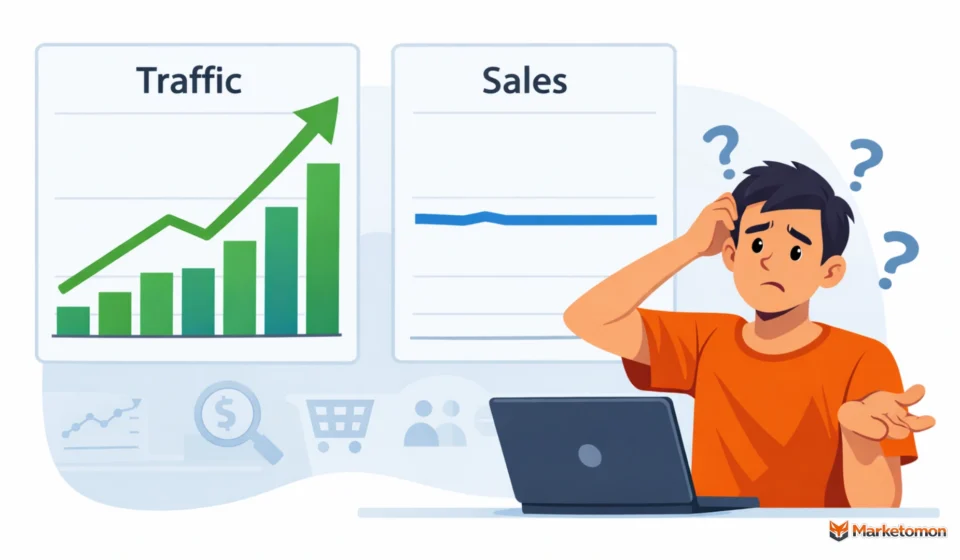
High traffic but zero sales is the ultimate slap in the face. You work hard to get visitors, your numbers finally go up, and then… nothing. No sales. No revenue. Just people browsing and leaving.
It’s frustrating because everything looks fine on the surface. Your website works. People are visiting. They’re clicking around. But when it comes time to actually buy something, they ghost you completely.
Let’s be real – getting people to visit your site is just step one. The other half is turning those visitors into customers, and that’s where most websites fall apart. The disconnect usually comes down to a few specific problems that are way easier to fix than you’d think.
This guide walks through the main reasons your website traffic increases, but sales don’t. We’ll cover what’s actually stopping people from buying and how to fix it without rebuilding your entire site or spending thousands on ads.
The Truth About Website Traffic and Sales
More visitors don’t mean more sales. That’s what most people find out the hard way. This confusion often comes from mixing execution tactics with direction, which is why understanding the marketing strategy vs marketing plan matters before trying to fix conversions.
Here’s a simple way to think about it: traffic is people visiting your site. Sales is people actually buying from you. These are two separate things.
You could get 5,000 visitors this month and sell nothing. Or you could get 500 visitors and make 20 sales. The number that matters is how many visitors turn into buyers.
This number is called your conversion rate. On average, most websites convert just 2 or 3 out of every 100 visitors into buyers. So if you notice that only a small fraction of your visitors make a purchase, that’s completely normal.
If you’re getting lots of traffic but zero sales, something’s stopping people from buying. The fix depends on what that something is.
7 Common Reasons Website Traffic Doesn’t Convert to Sales
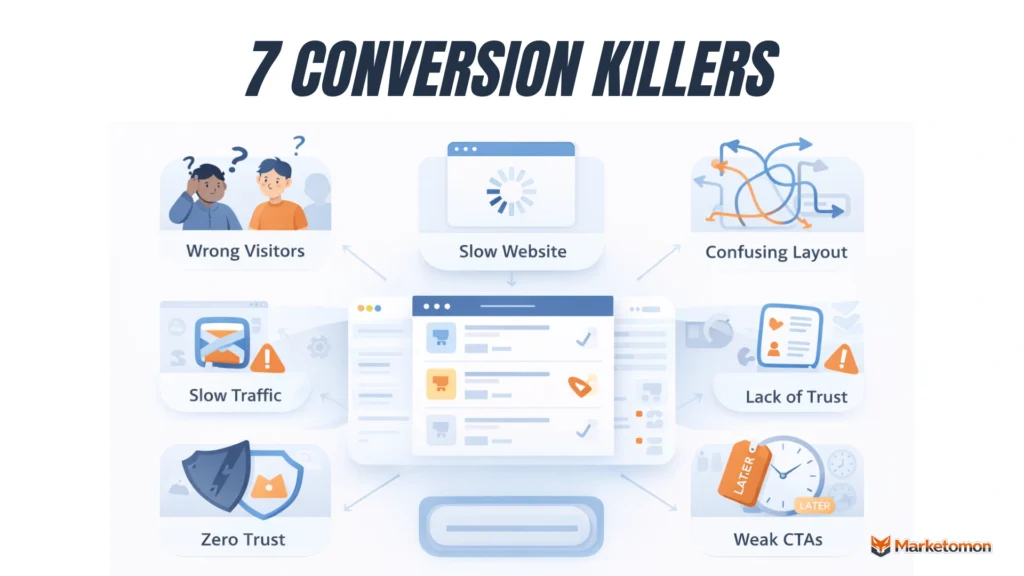
Most websites lose sales for the same basic reasons. The good news? Once you spot the problem, fixing it is usually pretty straightforward. Let’s break down the seven biggest conversion killers and what you can do about them.
1. Wrong Visitors
- What’s happening: You’re getting traffic, but these people were never going to buy from you anyway. They came looking for free information, not to shop. Or they’re from places you don’t even ship to.
- Why this kills sales: Imagine running a skateboard shop and all your visitors are looking for “skateboard history facts” instead of “buy a skateboard online.” They’re just browsing for school projects. Wrong crowd, zero sales.
- How to spot it: Check where your traffic comes from. Look at Google Analytics. Are people finding you through blogs and how-to articles? That’s info-seekers, not buyers. A high bounce rate means people leave fast because they didn’t find what they wanted.
- The fix: Target buyers, not browsers. Use keywords like “buy,” “shop,” or “best price.” If you sell running shoes, go after “buy running shoes online” instead of “how do running shoes work.” Update your ads to attract shoppers, not researchers.
2. Slow Website
- What’s happening: Your site takes forever to load. People click, wait three seconds, get annoyed, and leave. You lose the sale before your page even shows up.
- Why this kills sales: Nobody has patience anymore. Studies show 53% of people abandon websites that take more than three seconds to load. On phones, it’s even worse. Slow equals lost money.
- How to spot it: Check your speed with Google PageSpeed Insights. It’s free. Type in your URL and it gives you a score. Anything under 50 is bad. Also, try opening your site on your phone using regular mobile data, not WiFi.
- The fix: Compress your images. Most sites are slow because of huge photo files. Use tools like TinyPNG to shrink them. Delete plugins you don’t use. Enable caching. If you’re on WordPress, get a caching plugin like WP Rocket. These fixes take an hour max.
3. Confusing Layout
- What’s happening: Visitors land on your site and have no clue what to do next. Too many buttons, messy menus, or they can’t find the product they want. Confusion equals exit.
- Why this kills sales: When people feel lost, they leave. Simple as that. If finding your products feels like solving a puzzle, they’ll just buy from Amazon instead. Your competition is one click away.
- How to spot it: Ask a friend who’s never seen your site to find and buy something. Watch them struggle. That’s what your visitors experience daily. Also, check your site’s bounce rate. Above 70% means something’s confusing people.
- The fix: Simplify everything. Make your menu obvious. Put a search bar at the top. Your homepage should clearly show what you sell within five seconds. Use big buttons that say exactly what they do: “Shop Now” or “Buy Here.” Remove anything that doesn’t help people buy.
4. Zero Trust
- What’s happening: People don’t trust you enough to hand over their credit card. Your site looks sketchy, has no reviews, or seems too good to be true. Trust issues block sales hard.
- Why this kills sales: Would you buy from a random website with no reviews, no contact info, and spelling mistakes everywhere? Nope. Neither will your visitors. Online shoppers are paranoid about scams. One red flag and they’re gone.
- How to spot it: Look at your site like a suspicious buyer would. Is there a phone number? Real address? Customer reviews? Security badges? If you can’t find these easily, neither can your customers. No trust signals means no sales.
- The fix: Add customer reviews on every product page. Get a proper SSL certificate so your URL shows “https” with a lock icon. Toss in trust badges – stuff like “Secure Checkout” or payment logos. Write an About page with real photos. Add a clear return policy. Show social proof like “500+ happy customers.”
5. Bad Pricing
- What’s happening: Your price doesn’t match what people expect to pay. Either it’s way higher than competitors, or hidden fees pop up at checkout. Price surprises kill conversions instantly.
- Why this kills sales: People compare shop. They see your $50 product, check three other sites selling it for $30, and bounce. Or they add items to the cart, reach checkout, and the shipping costs $25. Cart abandoned. Sale lost.
- How to spot it: Google your own products and see what competitors charge. Are you more expensive? Check your cart abandonment rate. If it’s above 70%, people are ditching at checkout. Usually, because of surprise costs or price shock.
- The fix: Price competitively or show why you’re worth more. If you charge extra, explain why. Better quality? Faster shipping? Free returns? Say it clearly. Show total price upfront, including shipping. Offer free shipping over a certain amount. Add payment plans if you sell expensive stuff.
6. Weak Buttons
- What’s happening: Your buy buttons are invisible, confusing, or buried at the bottom of the page. People want to buy but can’t figure out how. Sounds dumb, but it happens all the time.
- Why this kills sales: If people have to hunt for the “Add to Cart” button, most won’t bother. They’ll assume you’re out of stock or the product isn’t available. Your button needs to scream “CLICK ME” without actually screaming.
- How to spot it: Scroll through your product pages. Can you instantly spot the buy button? Is it bright and obvious? Or is it the same color as everything else? Test on mobile too. Tiny buttons on phones are conversion killers.
- The fix: Make your buttons pop. Use bright contrasting colors. Red, green, or orange work great. Make them big enough to see and tap easily on phones. Use action words: “Add to Cart,” “Buy Now,” “Get Yours.” Put the button above the fold so people don’t have to scroll to find it.
7. No Urgency
- What’s happening: Visitors like your product but think “I’ll come back later” and never do. There’s nothing pushing them to buy right now. No deadline, no pressure, no reason to act today.
- Why this kills sales: Later rarely happens. People bookmark your site, forget about it, and buy from whoever they see next. Without urgency, you’re just letting potential customers slip away to think about it forever.
- How to spot it: Check how many people visit once and never return. Also, look at how long people take to make a purchase. If your average customer visits five times before buying, you need more urgency. Most should buy within two visits max.
- The fix: Add time-limited offers. “20% off ends Sunday” works. Show stock levels: “Only 3 left.” Use countdown timers on deals. Offer a first-time buyer discount that expires in 24 hours. Create FOMO without being pushy. Even simple “Limited stock” badges increase urgency and boost sales.
Your 30-Day Action Plan to Increase Conversions
Stop overthinking and start doing. Pick one problem from above that sounds like your site. Then follow these six steps to fix it and start seeing sales instead of just visitors.
Day 1-5: Speed Check
- Go check your site on Google PageSpeed Insights – it takes barely two minutes. If your score is below 60, your site’s too slow and people are leaving before it loads.
- Compress every image using TinyPNG. Delete old plugins you don’t use. Most slow sites just have massive photo files that nobody optimized. Fix this first because it affects everyone.
- Retest your speed score. Aim for 70 or higher. Anything above that means your site loads fast enough that speed isn’t killing your sales anymore.
Day 6-10: Button Makeover
- Find your main “Buy” or “Add to Cart” button. If it’s small, gray, or blends into your page, that’s why nobody’s clicking it. Change it immediately.
- Make it bright orange, green, or red. Make it twice as big. Put it at the top of your product page so people don’t scroll to find it.
- Test it on your phone. Can you tap it easily with your thumb? If not, make it bigger. Half your visitors are on phones and tiny buttons lose sales.
Day 11-15: Trust Boost
- Add reviews to your product pages. Real customer photos work even better than text reviews. If you don’t have reviews yet, email past customers and ask for them.
- Grab an SSL certificate if you haven’t already. Your URL should say “https” with a lock icon. This costs maybe $10 yearly, but it stops people from thinking you’re sketchy.
- Write a clear return policy. Put it on every product page. “30-day money back guarantee” beats no policy every single time because people buy when they feel safe.
Day 16-20: Price Fix
- Check what your competitors charge for the same product. If you’re way more expensive, either lower your price or explain why you’re worth the extra money.
- Show total cost upfront. Don’t hide shipping until checkout. People hate surprise fees and will abandon their cart the second they see unexpected charges at the end.
- Add a cheap option if everything you sell is expensive. Sometimes people just need a $20 entry product before they trust you enough to buy your $200 item.
Day 21-25: Urgency Test
- Create a one-time-limited sale. “20% off this weekend only” or “Free shipping ends Friday.” Set an actual deadline and stick to it so people learn you’re serious.
- Add stock counters to your bestsellers. “Only 4 left” makes people buy now instead of waiting. Real scarcity works because nobody wants to miss out completely.
- Try a first-timer discount pop-up. “Get 10% off your first order,” shown to new visitors can turn browsers into buyers within seconds of landing on your site.
Day 26-30: Results Check
- Open your analytics and compare this month to last month. Look at the conversion rate specifically. Did more visitors turn into customers? Even a 1% increase means real money.
- Calculate how much extra revenue you made from these changes. Multiply your new sales by the average order value. That number shows if this work actually paid off.
- Write down what worked best. Keep doing that thing. Drop what didn’t change anything. Then next month, pick another problem from the list and repeat this process.
Conclusion
Traffic means nothing if it doesn’t turn into money. The good news? Most conversion problems are fixable in under a month. Pick one issue from this list that sounds like your site. Fix it. Track the results. Then move to the next problem. Small changes add up fast. A slow website fixed today could mean 20% more sales tomorrow. Stop celebrating visitor counts and start counting actual revenue. Your bank account will thank you for it.